Scilab is one of the programming languages which allows manipulating variables in a very dynamic way. In this section, we will see how to create a real variable in Scilab, what elementary mathematical functions can be applied to a real variable, what may be the size of the name of variables, how to comment on a line in Scilab, and many more. So, let’s get started.
Creating Real Variables
Let’s see how to create a real variable in Scilab and how we perform simple operations with them.
As we know, Scilab is an interpreted language, so there is no need to declare a
variable before using it. For example, create a real variable x and
set its value as
x = 5, and then perform multiplication on this variable.
--> x = 5
x =

 5.

--> x = x + 20
x =

 25.
Here you can notice that the value of the variable is displayed each time a statement is executed.
If you don’t want this, then write the semicolon (;) character at the
end of the line. Let’s check it.
--> x = 5;
--> x = x + 20;
Here + is an algebraic operator used for addition in Scilab.
Elementary Operators
There are many algebraic and matrix operators available in Scilab. Here is the list of some of the elementary operators available in Scilab.

Variables and Their Size
Actually, there is no constraint for the size of variable names. It may be as long as you want, but only the first 24 characters are taken into account in Scilab. So, It is strongly advised that never use a variable name that is made of more than 24 characters.
Now let’s see what types of characters one can use for the variable names in Scilab.
In Scilab, we cannot use all the available characters for the variable name. Actually, only a few characters are allowed to use for the variable names. These characters may be
- All letters from “a” to “z” in lowercase as well as in uppercase
- All letters from “0” to”9″ and
- These six characters “%”, “_”, “#”, “!”, “$”, and “?”
Here one should be noticed the character “%” should not be used in the first place of a variable name because it has a special meaning in Scilab as you can see in the table below.
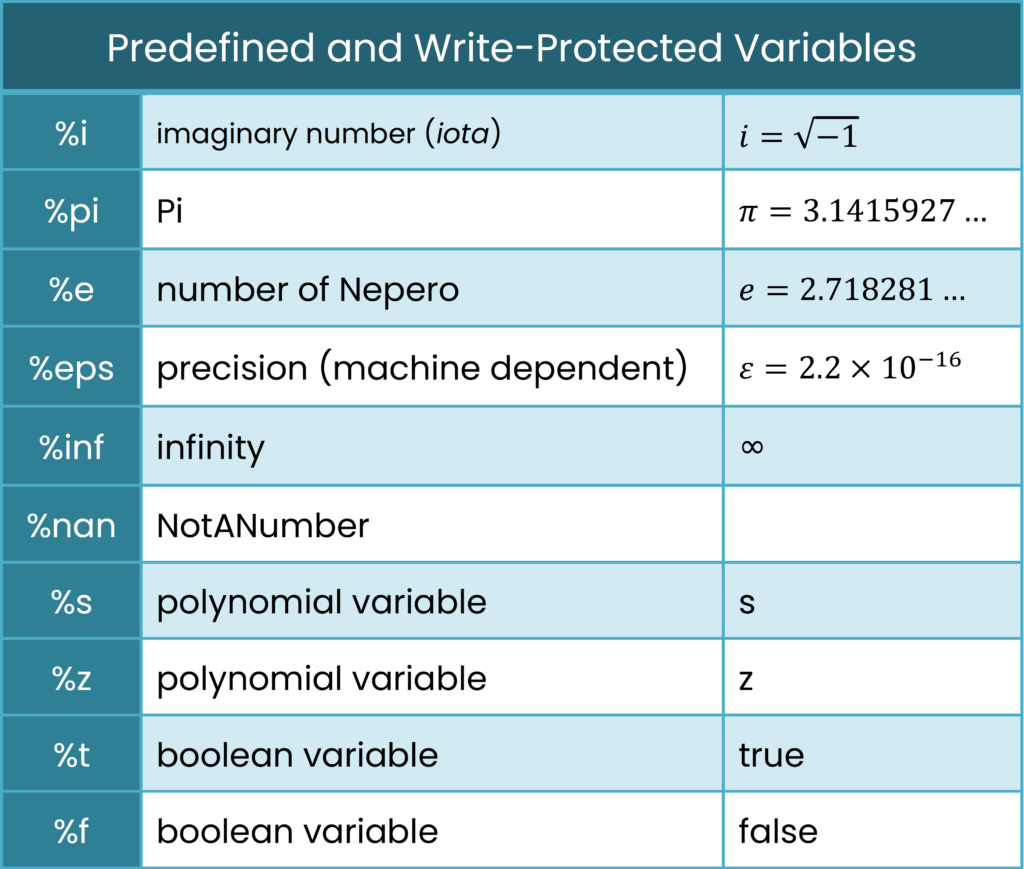
You should also keep in mind that Scilab is case sensitive, which means that upper- and lower-case letters are considered to be different by Scilab.
Comment in Scilab
If you write two slashes (//) at the start of a line, then that line
will be considered by Scilab as a comment and will be ignored.
If you want to make five consecutive lines as comments, then you have to start
each line with two slashes (//).
There is no alternative in Scilab like C/C++ where one can use
/* at the beginning of the comment and */ at the end.
Continuation Lines in Scilab
Suppose you have written a statement and it is too long to be written on a single line, then it will continue on the next line. But if you simply break the line like a sentence, Scilab will give an error.
In Scilab, to continue a statement onto the next line, you must put
two dots (..) at the end of the first line.
In the following program, you can see examples of both comments and continuation lines:
--> // It's a comment.
--> x = 2..
  > * 3..
  > + 5
x =

 11.