
In previous posts, you learned how to build 1D and 2D histograms in ROOT.
Now we will learn a very important skill used in almost every experiment:
plotting data points, with or without error bars.
ROOT provides two common classes for this:
TGraph— draw X–Y data pointsTGraphErrors— draw points with error bars
These are used widely in nuclear and high-energy physics for:
- Energy calibration curves
- Detector efficiency vs energy
- Reaction cross-section vs angle
- Time calibration (TDC channel vs time)
📄 Step 1 — Create a Python Script
Save the following as: tgraph_example.py
import ROOT
import math

# -------------------------------------------------------
# Example data (simulated measurements)
# -------------------------------------------------------
x_values = [1, 2, 3, 4, 5, 6]
y_values = [2.1, 4.3, 6.2, 7.8, 10.1, 12.2]

# Errors (optional)
y_errors = [0.2, 0.3, 0.25, 0.4, 0.35, 0.45]

# -------------------------------------------------------
# 1) Create a TGraph for simple X–Y data
# -------------------------------------------------------
graph = ROOT.TGraph(len(x_values))

for i in range(len(x_values)):
    graph.SetPoint(i, x_values[i], y_values[i])

graph.SetTitle("TGraph Example; X values; Y values")

# -------------------------------------------------------
# 2) Create a TGraphErrors for data with uncertainties
# -------------------------------------------------------
graph_err = ROOT.TGraphErrors(len(x_values))

for i in range(len(x_values)):
    graph_err.SetPoint(i, x_values[i], y_values[i])
    graph_err.SetPointError(i, 0.0, y_errors[i])  # No X error, only Y error

graph_err.SetTitle("TGraphErrors Example; X values; Y values")

# -------------------------------------------------------
# 3) Draw both graphs on a canvas
# -------------------------------------------------------
c = ROOT.TCanvas("c", "Graph Examples", 900, 700)
c.Divide(1, 2)

# Simple graph
c.cd(1)
graph.SetMarkerStyle(20)
graph.SetMarkerColor(ROOT.kBlue)
graph.Draw("AP")  # A = axes, P = points

# Graph with errors
c.cd(2)
graph_err.SetMarkerStyle(21)
graph_err.SetMarkerColor(ROOT.kRed)
graph_err.Draw("AP")  # automatically draws error bars

# -------------------------------------------------------
# 4) Save the canvas
# -------------------------------------------------------
c.SaveAs("tgraph_examples.png")
print("Saved: tgraph_examples.png")
▶️ Step 2 — Run the Script
cd C:\root\root\bin
thisroot.bat
py -3.11 C:\root\root\bin\root_2d_histogram.py
(In my computer, the path of the folder where the code root_2d_histogram.py is saved is C:\root\root\bin. You have to choose your folder path.)
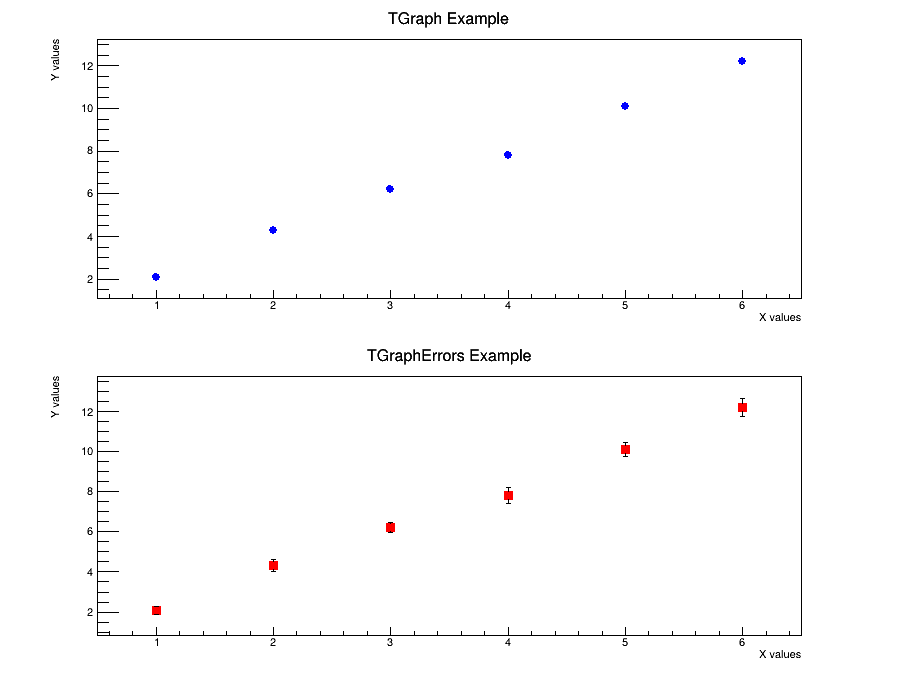
You will get a two-panel plot showing:
- Simple X–Y points
- Data with error bars
🔽 Detailed Explanation (Click to Expand)
Show / Hide Explanation
1️⃣ What is a TGraph?
TGraph is used when you have a set of X and Y values and want to plot them as points.
It does not include binning like histograms.
2️⃣ Creating the Graph
graph = ROOT.TGraph(len(x_values))SetPoint():
graph.SetPoint(i, x_values[i], y_values[i])3️⃣ Adding Error Bars (TGraphErrors)
graph_err = ROOT.TGraphErrors(len(x_values))- X values
- Y values
- X errors
- Y errors
graph_err.SetPointError(i, 0.0, y_errors[i])4️⃣ Draw Options (“AP”)
graph.Draw("AP")TGraphErrors, error bars appear automatically.
5️⃣ Saving the Graph
c.SaveAs("tgraph_examples.png")📚 Summary
TGraphis for simple X–Y plotsTGraphErrorsadds statistical uncertainties- Used widely in calibration, fits, and detector data analysis
- Draw option
APis most commonly used
TGraph with a polynomial (e.g., quadratic or linear). References & Further Reading
- CERN ROOT — Official Website: https://root.cern/
- Brun, R. & Rademakers, F. (1997). “ROOT – An Object Oriented Data Analysis Framework.” Nuclear Instruments and Methods in Physics Research A, 389(1–2), 81–86. DOI: 10.1016/S0168-9002(97)00048-X
- CERN Documentation: ROOT User Manual and Tutorials
- TMVA Toolkit for Multivariate Data Analysis: https://root.cern/manual/tmva/
- GEANT4 Collaboration. “GEANT4 – A Simulation Toolkit.” Nuclear Instruments and Methods in Physics Research A, 506(3), 250–303 (2003). DOI: 10.1016/S0168-9002(03)01368-8
- FLUKA Simulation Package — Official CERN Page: https://fluka.cern/
- CERN Open Data Portal — Public Datasets for Education and Research: https://opendata.cern.ch/
- CERN Scientific Computing Documentation: https://home.cern/science/computing
- C++ ROOT Tutorials for Beginners (Official GitHub Examples): https://github.com/root-project/root/tree/master/tutorials